 James Crawford
Key Takeaways
- C-F0 means the main control board and the display are not communicating.
- A damaged ribbon cable is a small repair, and a failed main board is the larger decision.
- A power cycle can clear a one-time glitch, but a returning C-F0 is a hardware fault.
- Stop using the oven if C-F0 comes back and do not keep power cycling it.
- Age and installation decide a board repair; a young or built-in oven favors repair.
The Bottom Line
Reset once, and if C-F0 returns, stop and get the cable and board checked. Repair when the cable is the cause or the oven is young, and weigh replacement only when an old oven has a failed board.
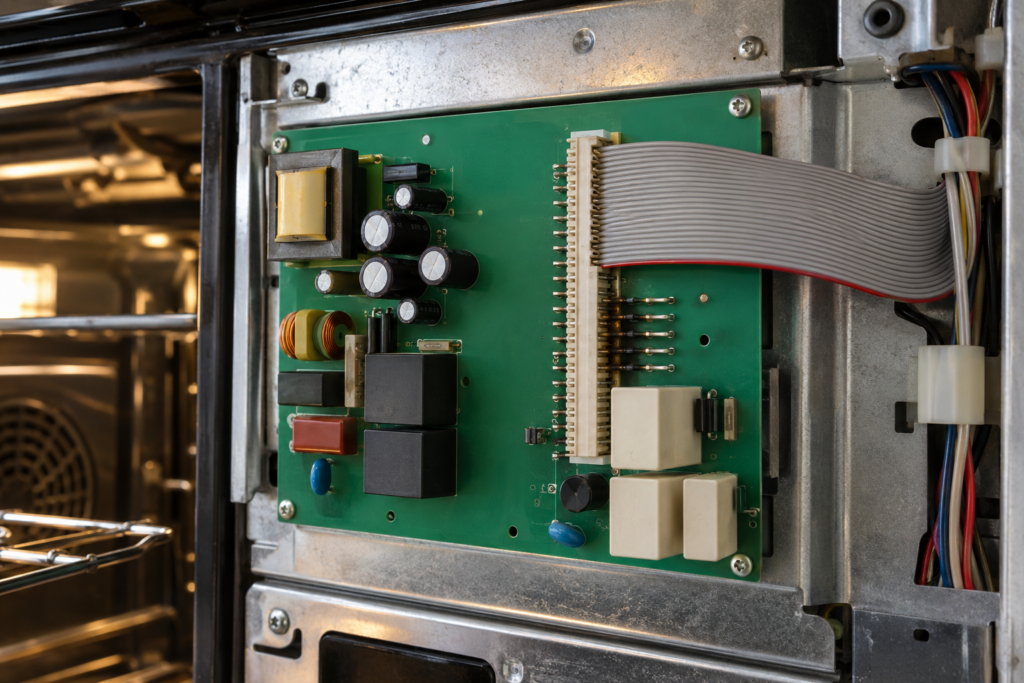
When a Samsung oven shows C-F0, the main control board and the display have lost contact with each other, and what you do next depends on which of the two links has failed. The Samsung oven C-F0 code page marks it high severity, says the oven cannot be fixed by the owner and points to two possible faults: a damaged ribbon cable between the boards or a failed main control board. A cable is a small repair. A board is the decision this guide is about.
| What you find | What it means | Verdict |
|---|---|---|
| C-F0 appears once, then clears after a power cycle | A one-time communication glitch | Watch it, repair only if it returns |
| C-F0 returns after every power cycle | A hardware communication fault | Repair: diagnose the cable first |
| Ribbon cable damaged, burned or loose | The link between the boards is broken | Repair: a small part |
| A new cable does not clear the code | A board-level failure | Weigh against the age of the oven |
What Does C-F0 Mean on a Samsung Oven?
C-F0 means the oven's control board and its display board are not communicating. The oven can then no longer take your settings or show its status reliably, which is why the code is rated high severity.
People also search for it as an F0 on a Samsung range or cooktop. The code on your display is the one to trust, and the code page covers the oven version. If your display shows something different, check the matching page on our site before you decide anything.
Samsung Oven C-F0 Repair or Replace: Which Is It?
Repair is the usual answer when the fault is the ribbon cable, and the answer depends on age when the main board has failed. A damaged cable costs little, but a board replacement is a larger repair and has to be judged against the rest of the oven.
- Repair when the cable is the cause. A burned or loose cable is a small part on an otherwise sound oven.
- Repair when the oven is young. A new board on a young oven resets the electronics for years.
- Weigh it when the board has failed on an older oven. A board repair adds up beside a new oven, and other parts will age alongside it.
- Replace when faults pile up. A swollen board, a worn door seal and a second heating fault is one oven nearing the end.
Our parent guide, repair or replace a Samsung oven, covers the whole machine, and our Samsung oven repair cost guide shows how a bill is built.
Is It Safe to Keep Using the Oven With C-F0?
Maybe, until it returns. The code page says to stop using the oven if C-F0 comes back after a power cycle, and not to power cycle it repeatedly, because that will not fix a hardware communication fault.
Treat the first appearance as a warning and the second as a stop sign, and do not rely on the oven for long bakes until it has been checked. Do not keep switching the oven on and off to see whether the display recovers, since the page warns that repeated power cycling will not fix a hardware communication fault.
Meanwhile, cook on another appliance if you have one, and leave the oven off at its breaker so nobody starts it by accident.
Can You Reset C-F0?
Yes, once. A power cycle at the breaker can clear a one-time glitch, and the code page lists reset as possible. If the code returns, stop, because the page is clear that a power cycle will not fix a hardware fault.
- Switch the oven off at its breaker for several minutes.
- Restore power and check whether the display responds normally.
- Run a short bake and watch the display and the temperature.
- If C-F0 comes back at any point, leave the oven off and book a diagnostic.
Do not remove the control panel yourself. The boards sit beside mains wiring, and the page lists board damage as a job for a technician.
What the Technician Checks
The technician starts with the cheap link and works toward the dear one. The page lists three things that call for a professional, and they map onto the order of the visit.
- The ribbon cable: checked for physical damage, burn marks or loose pins.
- A replacement cable: if a new one does not clear the fault, the problem is at board level.
- The main control board: checked for swollen capacitors, burn traces or cracked solder joints.
A technician can also tell you whether the fault is likely to spread. A cable with burn marks suggests heat in that area, and a board with swollen capacitors suggests age, and each of those changes how much confidence you should have in a cheap repair.
The repair time given on the code page is roughly an hour to two. If the board is the cause, the technician gives you the written estimate before ordering it, which is when the repair-or-replace sum becomes a number.
Related Oven Codes That Are Not C-F0
Several oven codes look similar from across the kitchen, and they point at different parts. Each has its own page on this site, and a quick look can save a diagnostic from starting on the wrong track.
- E-27: a temperature sensor failure, covered on the E-27 page.
- tE: a general temperature sensor error, on the tE page.
- E-08: a temperature sensor circuit that is open or shorted, on the E-08 page.
- -dE-: a door lock failure, on the -dE- page.
C-F0 stands apart because it is about the two boards talking, not about a sensor or a lock. If the oven heats normally and only the display misbehaves, that is a pointer in itself.
How Age and Installation Tip the Decision
Two questions matter more than the code: how old the oven is and how it is installed. A free-standing range is easy to swap, while a built-in wall oven means matching a cutout and trim.
- Under about ten years and sound: repair, because the rest of the oven has life left.
- Built into cabinetry: repair is more likely, since replacement adds installation work.
- Old, with a flaky display and other faults: add up the faults before you spend on one of them.
When you book, have a few facts ready: the model number, the exact code, whether it is a wall oven, a range or a double oven, and what happened just before the code appeared. A photo of the display saves time too. Those details let the technician bring the right cable and a board for your model.
For help with the sum, see our guide to whether a Samsung range is worth repairing. Our Samsung oven repair service covers cables and boards, and you can book a visit or tell us how the display behaves so the right part comes on the first trip.